
Ditch paper.
Log smarter.
The film logging app for script supervisors and camera crews. Log a take in seconds, export clean PDF log sheets at wrap.
★★★★★ Rated 5.0 on the App Store · Free to download on iOS and Android
How it works
From first slate
to wrap report.
Set up your project.
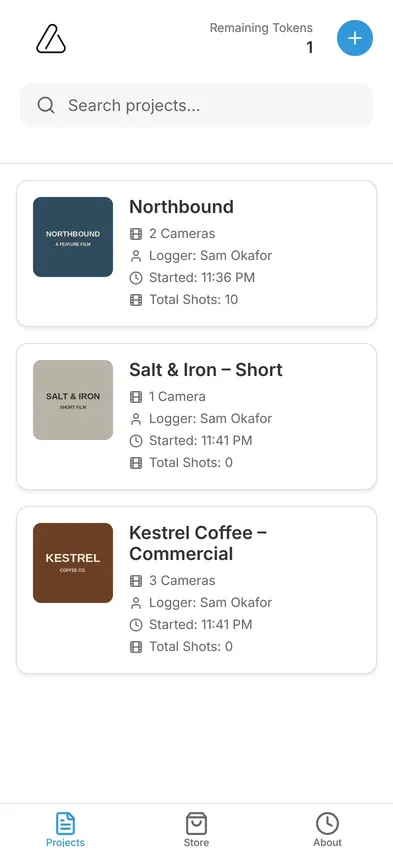
Add the crew, choose how many cameras you're running, and pick the fields your log sheet needs. Do it once, at the start of the job.
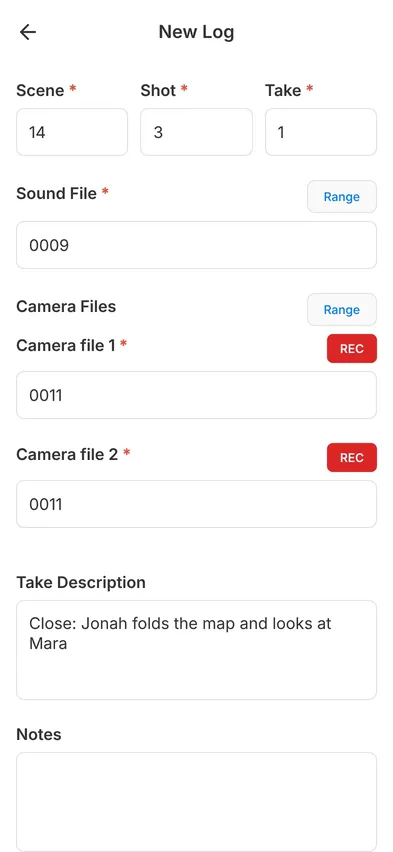
Log every take in seconds.
Tap +, and scene, shot, take and file numbers are already there. Add a description, mark it good, insert, waste, MOS or no slate, and you're ready for the next one.
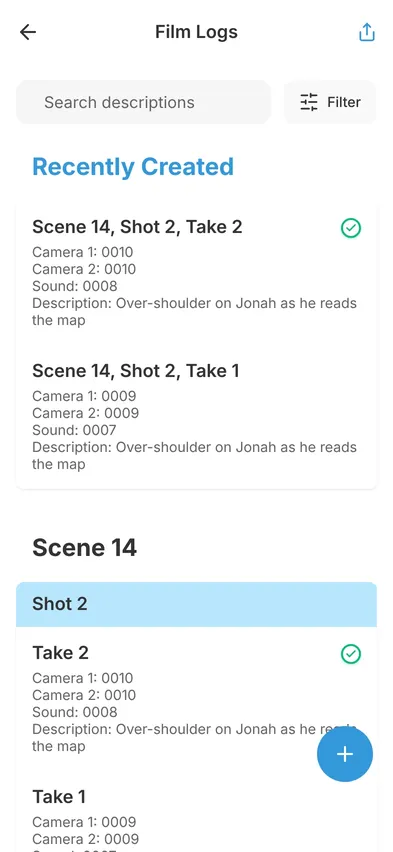
Find any take instantly.
Takes are grouped by scene and shot, and every description is searchable. When the director asks for "the one where he drops the map", it's right there.
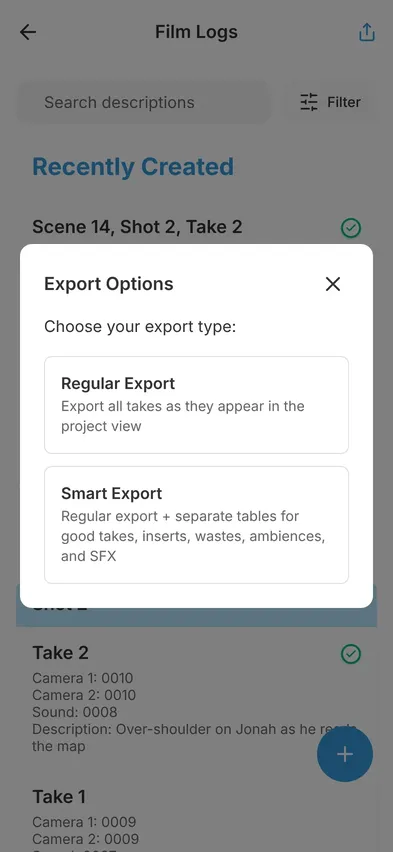
Export at wrap.
Smart Export builds a PDF with separate tables for good takes, inserts, wastes, ambience and SFX. Share it with post before you've left the set.
Built for real sets
Fast when it's chaos.
Right when it counts.
Multi-camera, without the mess.
Track separate file numbers for every camera on the same take, and switch REC on or off per camera.
Works offline.
Basements, deserts, stages with no signal. LogMe never needs the internet.
Inserts without renumbering.
Add a take before an existing one, and every file number after it shifts for you.
Mistakes caught while you log.
Duplicate takes and file numbers get flagged before they reach the edit.
Your fields, your way.
Private by design.
No account, no cloud. Your logs stay on your device until you share them.
Your crew on every report.
The director, cinematographer and logger are named on every PDF you export.
Who it's for
Made for the people
who log.
Script supervisors
Descriptions, good takes and script notes in one place, searchable by scene.
2nd ACs and loaders
Camera files carry over take to take, on every camera you run.
DITs
Duplicate and out-of-order files flagged while you log, not in the edit.
Sound recordists
Sound roll and file numbers sit next to every take for easy syncing.
Assistant directors
See what's been shot at a glance, and send a clean report from your phone at wrap.
Export
Log sheets every
department expects.
One tap turns your day into a clean, professional PDF.
Pricing
Free to start.
Pay per project.
Download LogMe free and get 15 logs to test it before the shoot. After that, one token unlocks each new project with unlimited logs.
- Tokens never expire, so buy a pack now and use it on any job.
- One project, one token, however many shoot days it runs.
- No subscription and no account.
Prices in US dollars. The store shows the price in your local currency.
Questions
Good to know.
How many tokens do I need?
One token unlocks one project with unlimited logs, from the first take to the final export. A single token is $4.99, 4 tokens are $16.99 and 10 tokens are $34.99.
Do I pay per shoot day or per project?
Per project. A one-day commercial and a 30-day feature each use one token.
Do tokens expire?
No. Tokens never expire, so you can buy a pack now and use it on whichever job comes next.
Can I try LogMe before I buy?
Yes. When you download LogMe you get 15 free logs to test it out. After those 15 logs, you buy a token to create a new project.
Is LogMe on Android?
Yes. LogMe is on the App Store for iPhone and iPad, and on Google Play for Android.
Is there a subscription?
No. There's no subscription and no account. You only pay when you unlock a project.
What happens to my logs?
They're stored on your phone, not in the cloud. Nothing leaves your device unless you export or share it, and you can export the PDF and keep a copy wherever you like.
Does LogMe work without internet?
Yes. Everything works offline, so you can log on stages, in basements and on remote locations.
Your next shoot,
paper-free.
Available on the App Store for iOS 15.1 or later, and on Google Play for Android.